

Captions
Automatic captions for Russian speech
ReelFab recognises Russian speech and adds captions to your reel. Review names, numbers and terminology in the editor, choose a style and export your video. Captions are burned into the finished MP4, so they remain visible when it is played.
How it works
Open the processed reel
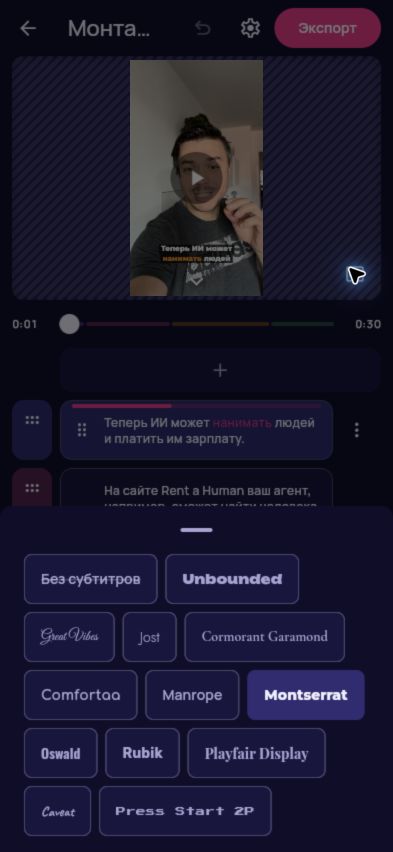
After the AI edit, the editor displays episodes with their recognised speech.
Check speech against text
Listen to the reel and compare its speech with the captions, especially names, numbers and specialist terms. If recognition is inaccurate, try a recording with clearer speech in a new reel.
Choose a caption style
Open the captions button in the preview and select one of 12 fonts. Check readability on a phone.
Preview and export
Watch with sound on and off. Export an MP4 with the selected captions built into the video.
What to know
- Recognition language
- Russian. The English interface does not imply English speech recognition.
- Styles
- 12 fonts, including Manrope, Montserrat, Jost, Unbounded and Oswald.
- Review
- Compare the recognised text with the speech and check the selected font’s readability before exporting.
- Export
- Captions are burned into the MP4. Choose No subtitles to export without them.
Questions and answers
Should I check automatic captions?
Yes. Speech recognition can make mistakes. Check names, numbers and meaning before saving the result.
Can I change the font?
Yes. Open the captions panel, select a font and review it in the video preview.
Can I export without captions?
Yes. Select No subtitles in the captions panel before exporting the video.