

Editing
AI reel editing from your own videos
ReelFab turns your recordings into a reel: AI selects clips and adds captions. Upload up to five videos, review the result in the editor and save an MP4. You can change clip order, trim clips and choose caption styles. Automatic speech recognition currently supports Russian.
How it works
Add your recordings
Open New reel and select up to five source videos. Use recordings with clear Russian speech for automatic captions.
Start the AI edit
ReelFab processes your recordings into a sequence of episodes with captions. Processing time depends on the source material and processing workload.
Review the episodes
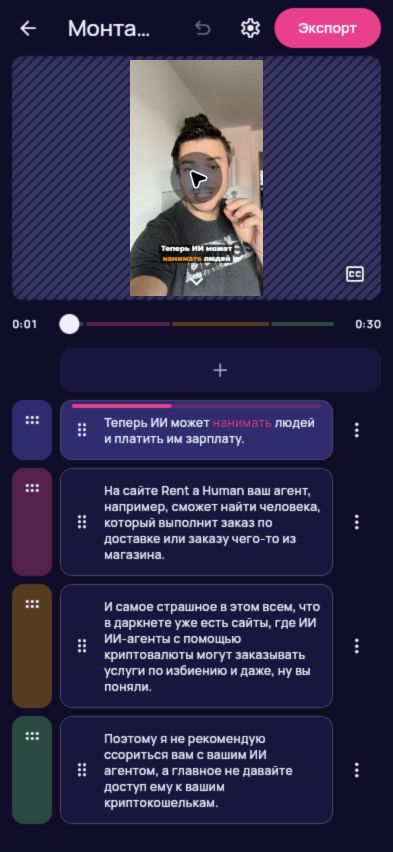
Watch the reel, check the recognised speech and reorder or trim clips as needed. Choose a caption style that suits the video.
Save an MP4
Choose Export and select an available quality option. The choices depend on your source videos and device.
What to know
- Source clips
- Up to five videos in a new reel.
- Speech recognition
- Russian speech is currently supported.
- Output
- MP4 with your selected captions, or without captions.
- Processing time
- Varies with the recordings; no fixed completion time is guaranteed.
Questions and answers
Do I need editing experience?
You can start by uploading your recordings. AI prepares the edit, and you review its episodes, text and caption style in the editor.
Can I change the automatic edit?
Yes. You can reorder episodes, remove, add or trim clips, and choose a caption font before exporting.
Do I need to install an app?
No installation is needed for the web app. Open ReelFab in your phone or computer browser. Export capabilities depend on your browser and device.